Articles
Operating Software for Painting Contractors

Run your painting company
with a fraction of the work.

Keep the estimating, CRM, payroll, banking, and accounting tools that already work for you. PaintCurrent brings the operating side of the business together so you spend less time gathering information, rebuilding numbers, and trying to figure out where the company stands.

Save time. Know the numbers. Stay current.
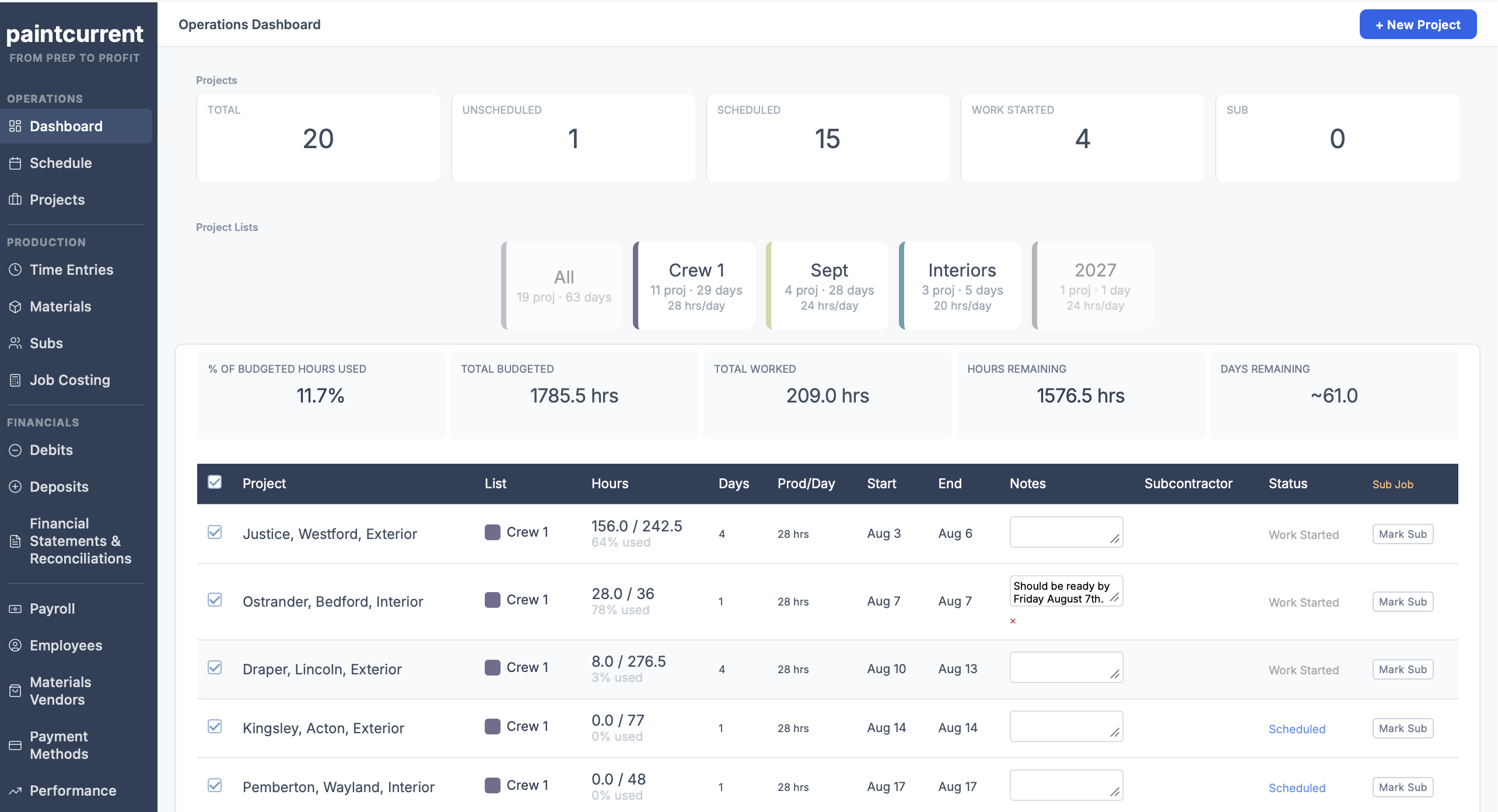
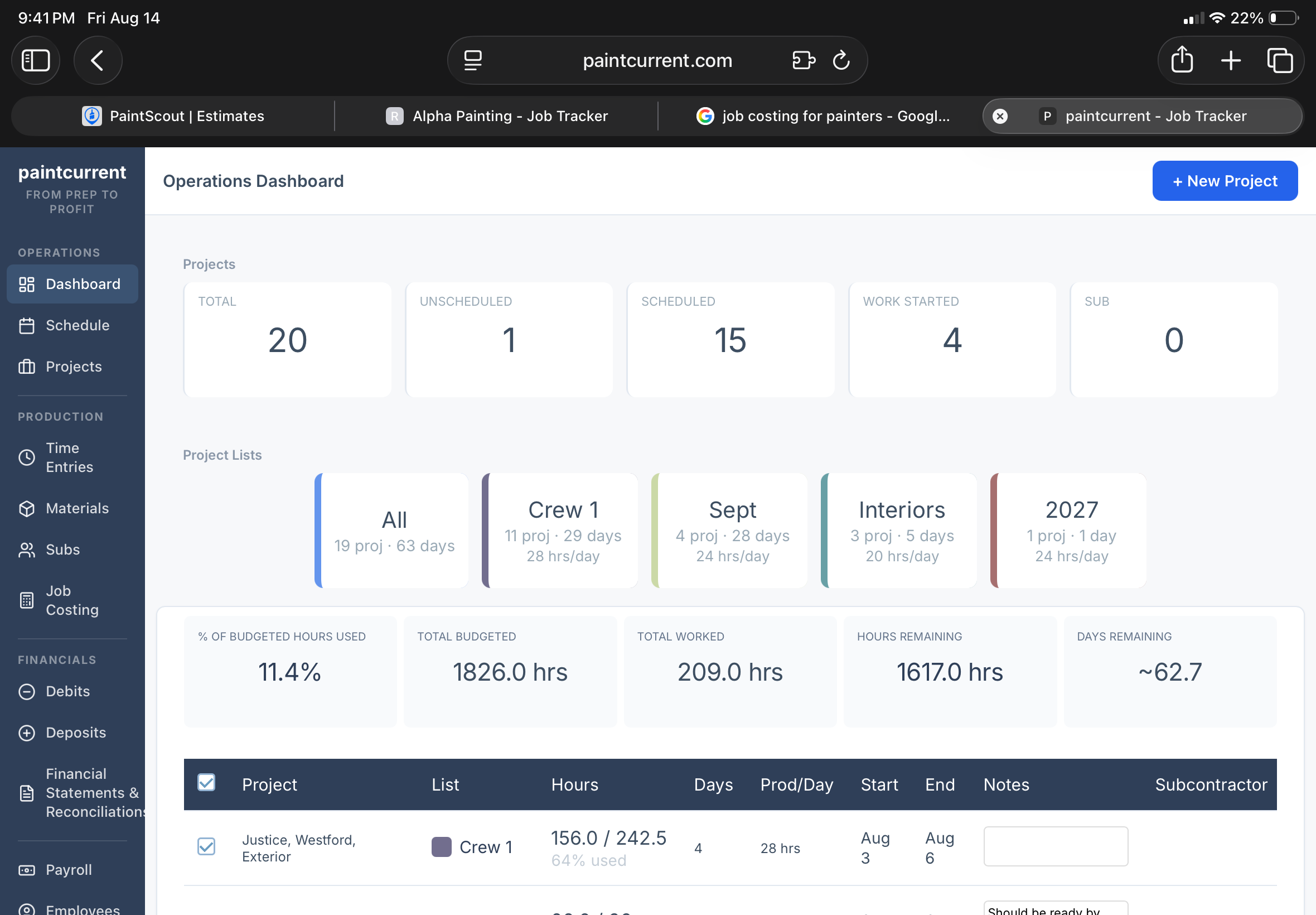
PaintCurrent operations dashboard — projects, scheduled work, production hours and company KPIs

Less gathering, copying and recalculating

Enter or connect the information once. The system keeps the calculations current.

Current, not reconstructed

The operating picture stays together as the company runs — not rebuilt every time you need an answer.

Phone · tablet · desktop

Open it from the field, the office, or anywhere the question comes up.

Keep the tools that work

CRM, estimating, payroll and accounting can stay. PaintCurrent works around them.

Use PaintCurrent Your Way

Three ways to use PaintCurrent.

Option 1

Use PaintCurrent on its own

You do not need another system to run PaintCurrent. Enter your projects, estimated hours, actual hours, materials, subcontractors, payroll and expenses directly into the app. PaintCurrent can be the operating system by itself.

Option 2

Pair it with a CRM

For most painting contractors, we recommend using PaintCurrent alongside a good CRM and estimating system. We particularly like PaintScout because its production-rate estimating fits naturally with the way PaintCurrent follows production hours after the sale.

Production-rate estimating establishes what should happen. PaintCurrent follows what actually happens.

Option 3

Connect the systems you already use

Already have sales, payroll and accounting systems you like? Keep them. PaintCurrent can connect to or receive information from those systems and bring it into one operating picture — so instead of logging into multiple systems and rebuilding reports, you have immediate access to current production, job-costing and company-performance reporting.

Use PaintCurrent by itself, pair it with your CRM, or connect the systems you already have.

The goal is the same: enter the information once, keep it connected, and know where the company stands.

Immediate Answers

Open your phone and know
where the business stands.

Instead of gathering information every time you need an answer, the numbers are already there.

How much work do we have?

See how many projects, production hours, and working days are booked. See how much work each crew has ahead. Know whether you need more work — or whether you're already booked further out than you realized.

What's happening with the schedule?

The schedule is built around actual crew productivity. Change a start date, production hours per day, number of days a job should take, or project order — the schedule recalculates.

How are the jobs doing?

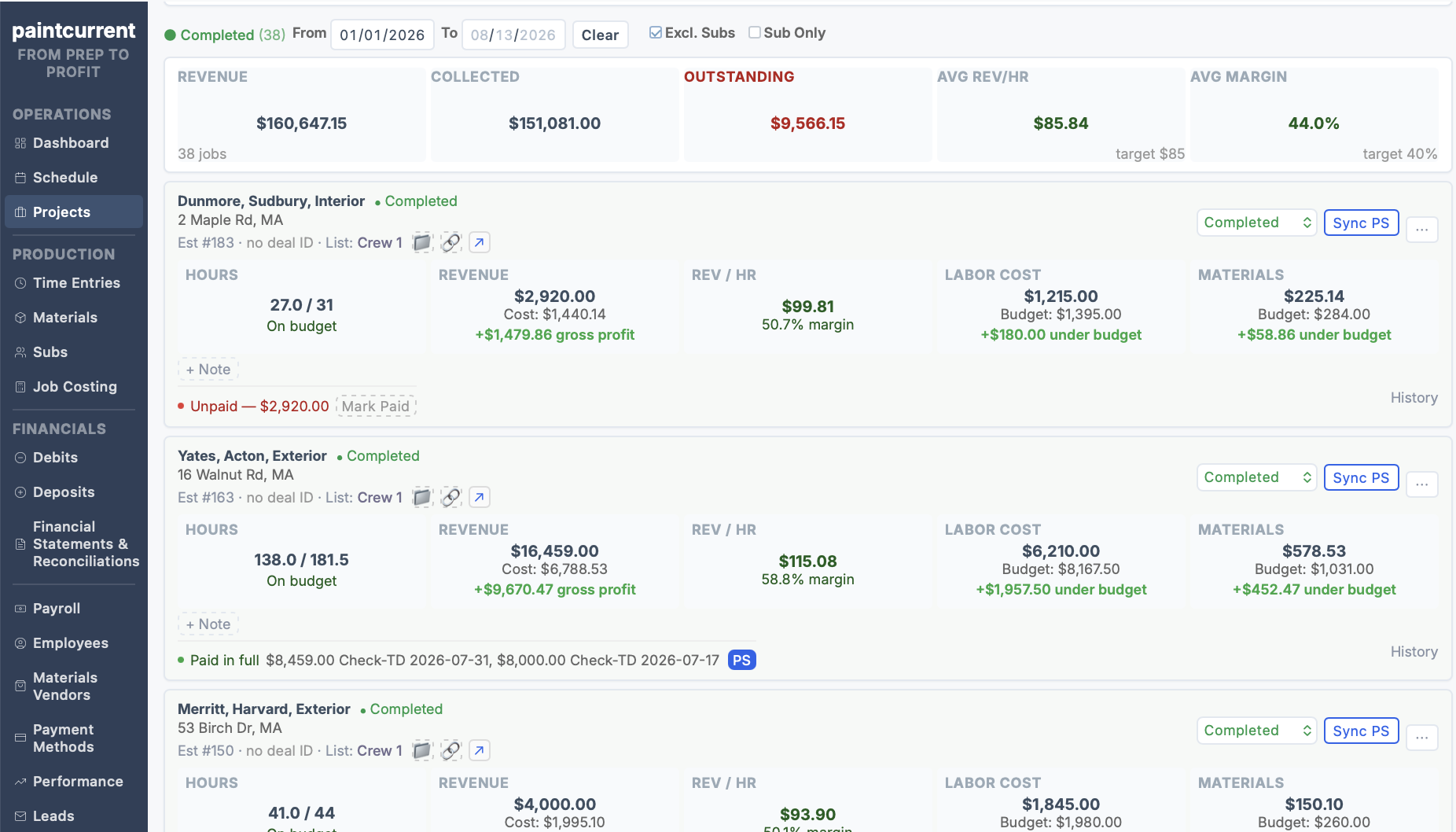
See budgeted hours against actual hours. Track labor, materials, subcontractors, revenue, collections, balances, and current project performance. See completed-job results without rebuilding the job after it's over.

What is the company actually making?

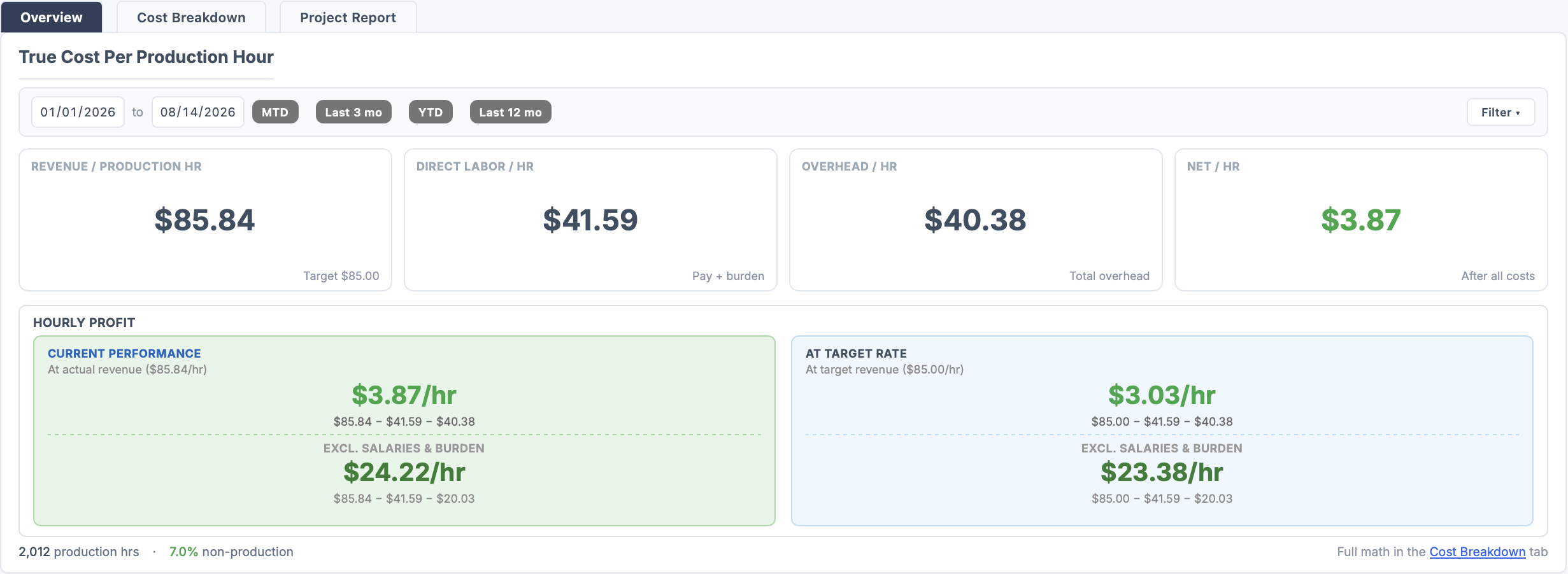
Follow production beyond the individual job. See revenue per production hour, actual labor cost, payroll burden, true overhead per production hour, job profitability, subcontractor margins, and net profit per production hour.

Job performance and company performance in the same operating view.

PaintCurrent Operations Dashboard showing budgeted vs. actual production hours per project
Already Estimate With Production Rates?

Don't stop measuring production
when the estimate is accepted.

Your estimate tells you how many production hours the job should take. PaintCurrent keeps following those hours after the estimate is accepted.

Estimated Production Hours Actual Production Hours Revenue per Production Hour Actual Labor & Materials Job Margin True Overhead per Production Hour Net Profit per Production Hour

You already use production hours to determine what the work should cost and what you should charge. PaintCurrent follows those same hours further — through actual production, actual costs, overhead, and company profitability.

You already use production hours to figure out what to charge. Now use them to see what you actually made.

Production Rate Estimating: What Happens After the Estimate? →

From the Founder

Why I built it.

Socrates Stamateas — Alpha Painting

CRM helped. Estimating software helped. Payroll helped. Accounting helped.

But every system solved its own piece. Production hours were in one place. Payroll was somewhere else. Materials, expenses, receivables and bank activity were somewhere else again.

Overhead, non-productive labor and the true cost of running the company were always things I could figure out — but gathering everything and running the numbers was a project. Keeping up with the business was becoming a job of its own.

The dream was not complicated: enter or import the information once, keep it connected, and be done with the second job of rebuilding the numbers every week.

Read the full story →

The Real Operating Workflow

Here is exactly how I use PaintCurrent.

PaintCurrent is not something I open once a month to create a report. It is the operating layer I use throughout the week.

1

Run the work.

Most of the work happens while I am already running the company.

Dashboard How many hours and days of work are booked? How many days does each crew have? What is outstanding?
Scheduling Crew productivity drives the schedule. Reorder jobs and dates recalculate. Override start dates, hours/day, project duration or buffers when reality requires it.
Projects Receivables, balances, performance and quick completed-job KPIs — available for every project moving through production.
2

Capture what actually happened.

The inputs that determine whether the job performed.

Time Productive and non-productive hours. Actual field time goes into job costing instead of being reconstructed later.
Materials Actual job materials assigned where they belong — attached to the project that used them.
Subcontractors Direct sub cost and project margin tracked separately from employee labor without losing the combined picture.
Job Costing Hours, labor, burden, materials, subs, revenue and margin — with the calculations visible so you understand why, not just what.
3

Keep the money current.

The operating picture tied to actual financial activity.

Debits Every way money leaves and the transactions behind it — categorized and connected to the financial picture.
Deposits What came in and how it was received — reconciled against operating activity.
Financials Financial statements and reconciliation: the operating picture tied to actual bank and card activity.
Payroll Process it, reconcile it and keep it connected to production and overhead — not maintained separately from everything else.

The payoff: I still run the company. Hours still get entered. Payroll still gets processed. Expenses still get recorded. PaintCurrent eliminates the work I used to do after those things just to find out where the company stood.

Employees, Subcontractors, or Both

Built for the way painting companies actually produce work.

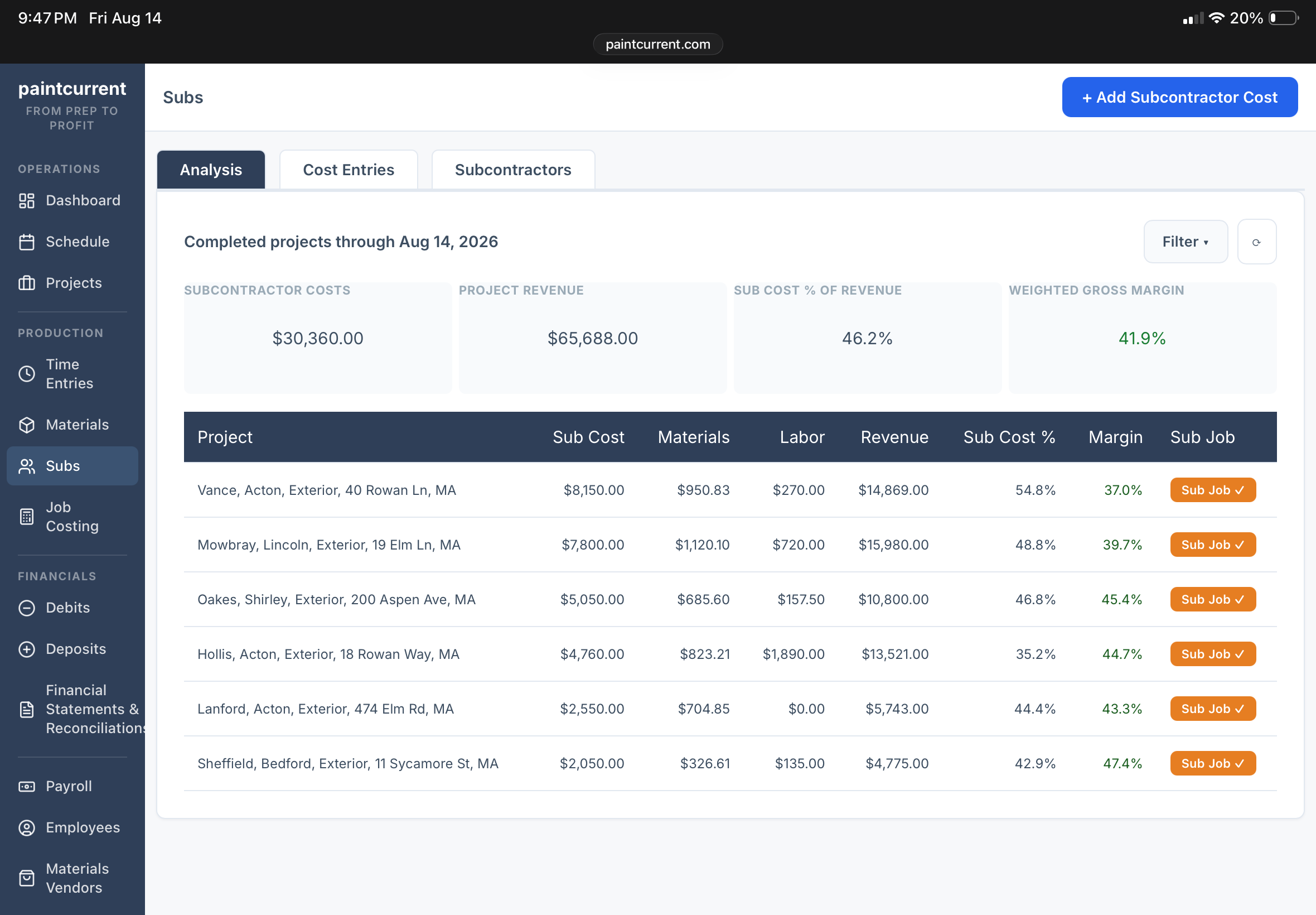
Run W-2 crews. Use subcontractors. Or use any mix of both. Employee labor and subcontracted labor behave differently financially — and PaintCurrent keeps them measured appropriately without forcing everything into one labor model.

W-2 production
Tracked through actual hours, payroll cost, employer burden, materials, job performance, and company overhead.
Subcontracted work
Tracked through subcontractor cost, materials, revenue, and margin — without distorting W-2 revenue-per-hour numbers.
Mixed model
Both on the same job. PaintCurrent keeps each measured appropriately while still producing meaningful job-level and company-level reporting.

W-2 employees. Subcontractors. Any mix. Even on the same job.

PaintCurrent Subs Analysis — subcontractor costs, project revenue, sub cost % of revenue, weighted gross margin, and per-project margins
From the founder
"PaintCurrent was designed around the way I actually needed to run a painting company: W-2 employees, subcontractors, or any mix of both — even within the same project — while still producing reporting that means something."
— Socrates Stamateas, Alpha Painting
Job Costing

The numbers behind the number.

A margin percentage by itself isn't enough. PaintCurrent shows the calculations underneath the result so you can understand what actually happened — not just what the job made, but why.

  • Revenue & production hours — See what the job generated against what it consumed.
  • Payroll wages & employer burden — Real labor cost, not just an hourly rate.
  • Materials & subcontractor costs — Direct costs attached to the job that incurred them.
  • Revenue per production hour — How efficiently the job converted hours into revenue.
  • Job margin & company overhead — The job's contribution and what the company had to carry.

The goal isn't simply to tell you a job made 28%. The goal is to let you understand why.

PaintCurrent Job Costing — True Cost Per Production Hour showing revenue, labor, overhead, and net profit per hour PaintCurrent completed jobs — revenue, collected, outstanding, and per-project margins
Company Profitability

Know the difference between a profitable job and a profitable company.

A job can hit its labor budget and show a healthy margin. The company can still lose money.

Office payroll still exists. Vehicles still exist. Insurance still exists. Software, advertising, recruiting, rent, administration, non-production labor, and everything else required to operate the company still has to be paid.

PaintCurrent connects company overhead to the production hours that have to support it.

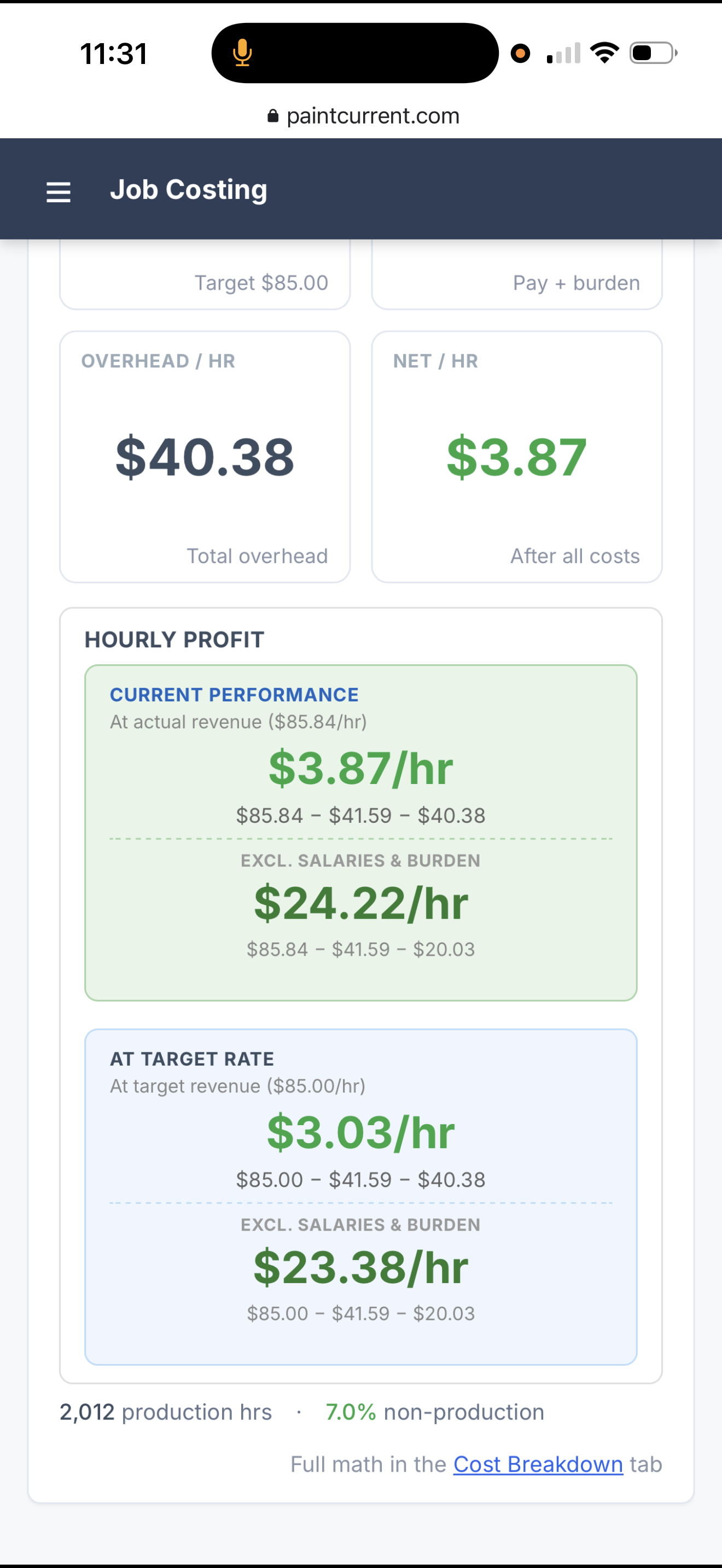
After the jobs paid their direct costs and the company paid its overhead, what was left for every production hour the company produced?

That's the difference between job profitability and company profitability.

Learn about True Overhead per Production Hour → Learn about Net Profit per Production Hour →
PaintCurrent Hourly Profit — current performance vs. target rate
Payroll

Payroll without rebuilding payroll.

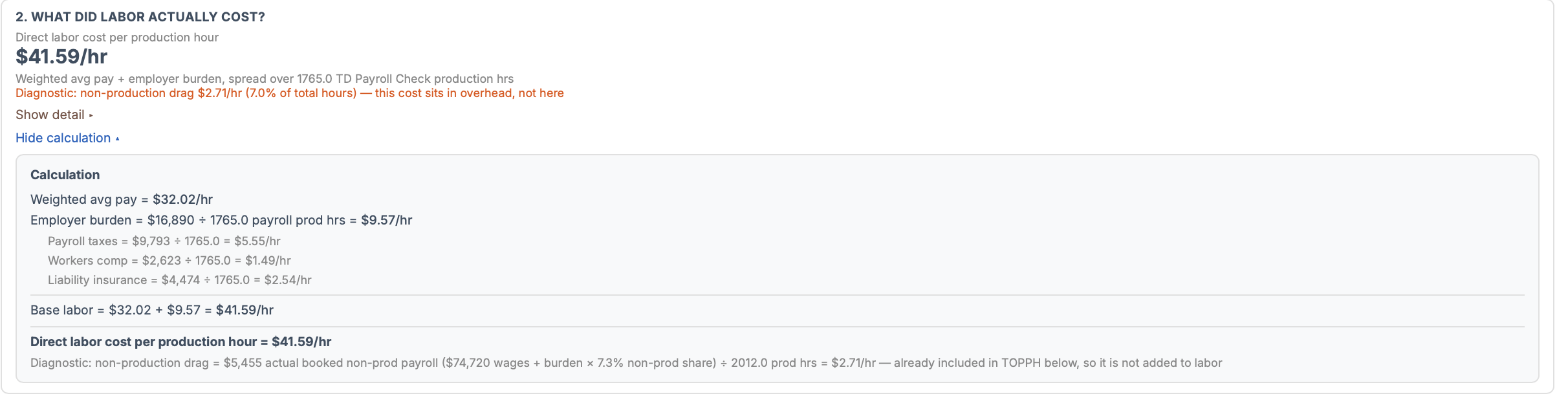
Payroll is one of the most important sources of operating information in a labor-driven company. PaintCurrent lets you process, reconcile, and access payroll data as part of the same operating system — not as a separate disconnected calculation you redo every time you want an answer.

Payroll history
See past runs, wages, net pay, and cleared status in one place.
Production vs. non-production hours
Separate job hours from shop work, meetings, training and other paid time.
Employer burden
SS, Medicare, and other employer costs included — not just the wage rate.
Bank reconciliation
Reconcile payroll against money actually leaving the bank so the numbers agree.
PaintCurrent direct labor cost per production hour — weighted average pay plus employer burden breakdown
Financials & Reconciliation

Know where the money went.

Debits

See every way money leaves the business. Bring transactions in, categorize them, and connect expenses to the financial picture.

Deposits

Track money entering the company and reconcile it against operating activity.

Financial Statements

See current financial performance without waiting until the end of the year to find out what happened.

Reconciliation

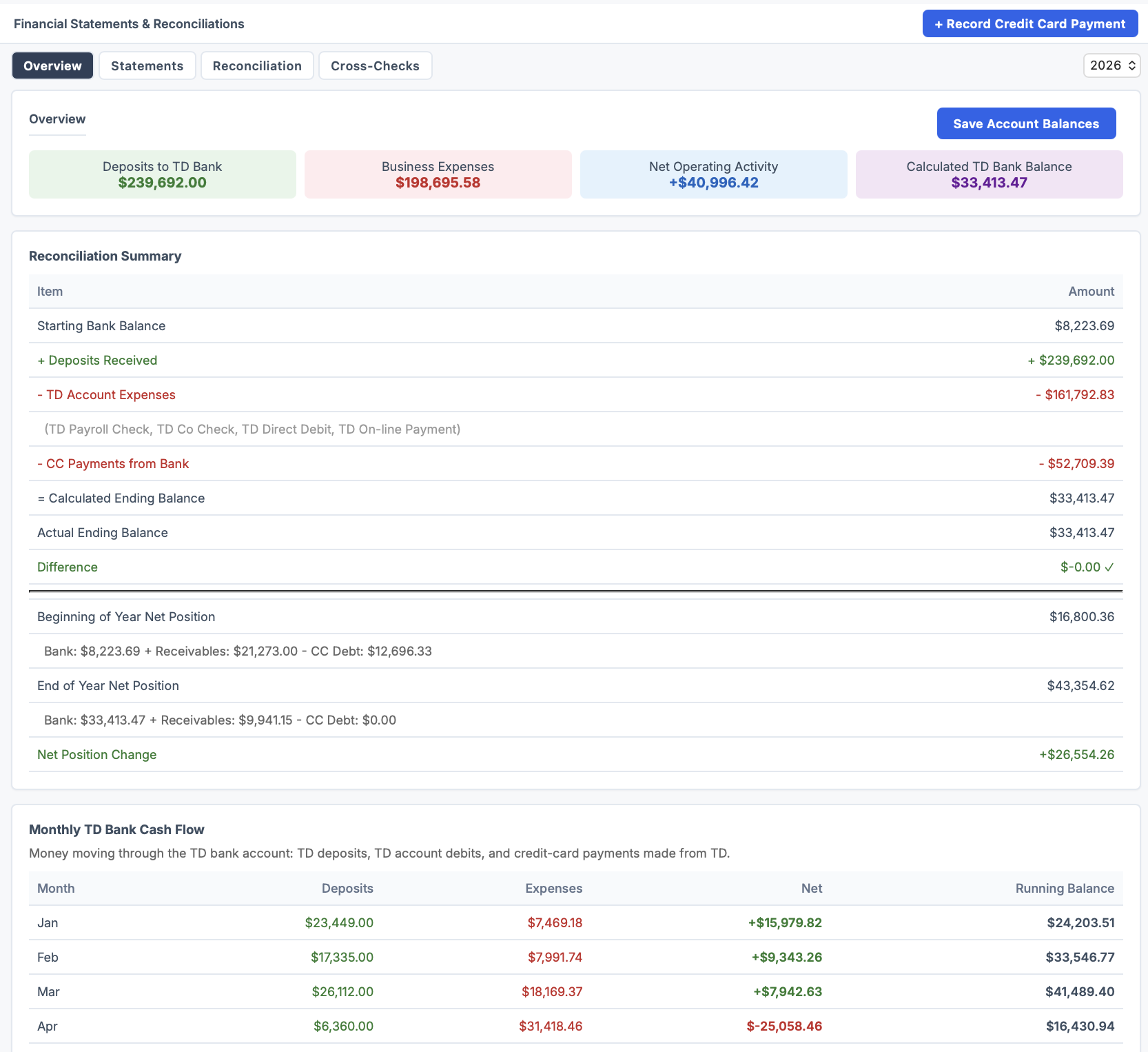
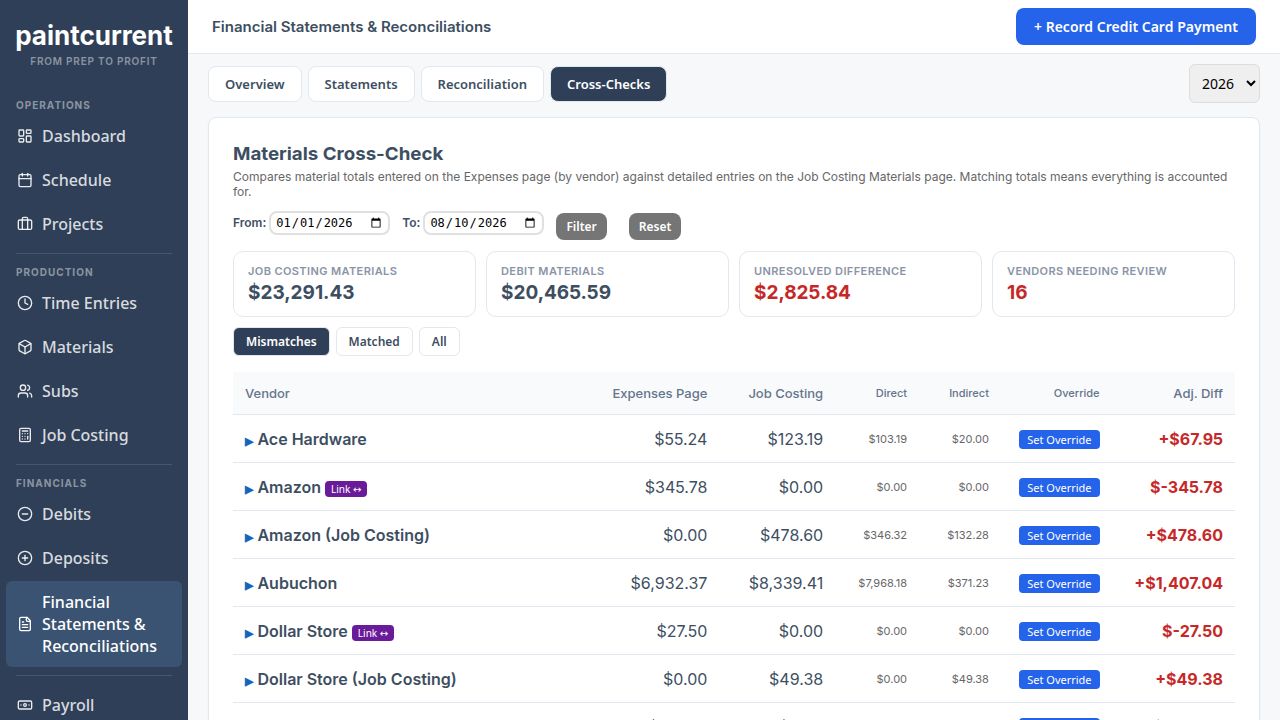
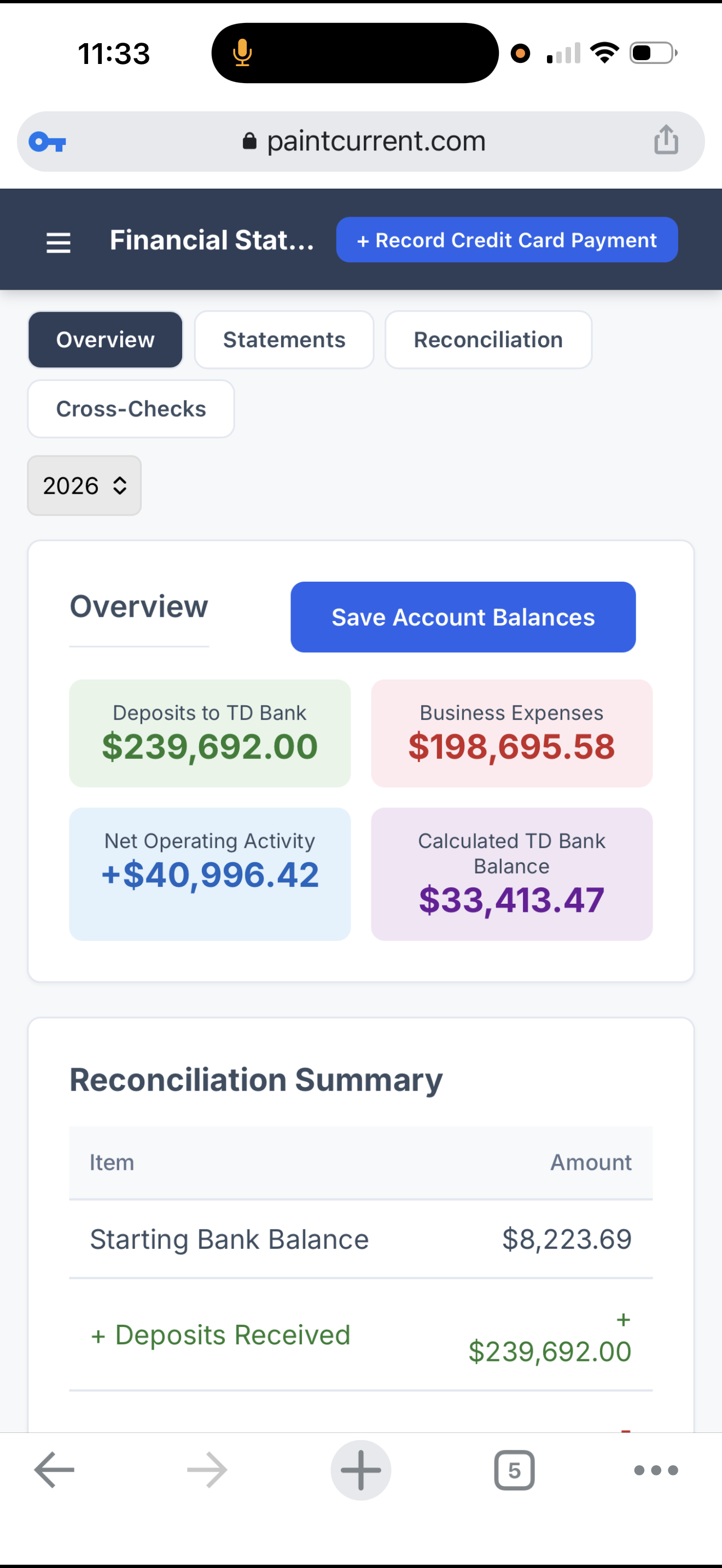
Make sure the operating data agrees with actual financial activity. PaintCurrent doesn't just show clean numbers — it flags exactly where costs don't yet agree with records, so nothing quietly falls through the cracks.

PaintCurrent reconciliation summary — deposits, expenses and CC payments tied to actual bank balance

Bank and credit card reconciliation — beginning and end balances with all differences at zero.

PaintCurrent materials cross-check flagging an unresolved difference between job costing materials and vendor records

Materials cross-check — flags where job costing materials don't yet agree with vendor expense records.

The Operating Rhythm

A small routine keeps the picture current.

For a company using a payroll service, one bank account, and a small number of credit cards, the routine can be simple. Because the operating information is maintained as the business runs, you don't have to start over every time you want to know how the company is doing.

During the week
Production
Projects, hours, materials, progress and schedule changes happen as the work happens. Run the company. PaintCurrent keeps up.
Weekly
Payroll + bank
Process and reconcile payroll, capture actual labor and burden, and reconcile primary bank activity.
Monthly
Cards + remaining expenses
Finish credit cards, creditors and remaining operating expenses. The period is essentially current and complete from an operating standpoint.

A fraction of the work. Complete current visibility.

PaintCurrent Reconciliation Summary — calculated and actual bank balance matching exactly
What the Connected Workflow Gives You

Three questions answered without rebuilding the numbers.

Question 1
Are the crews producing?
Budgeted vs. actual production hours, capacity, and productive vs. non-productive time — tracked continuously, not reconstructed at the end of the week.
Production Efficiency
Question 2
Did the jobs make money?
Revenue against actual direct labor, burden, materials, subcontractors, and direct costs. The job's contribution — before company overhead clouds the picture.
Job Margin
Question 3
Are the jobs carrying the company?
Bring in salaries, non-productive labor and operating overhead. See what production leaves behind after carrying both the work and the entire company.
Net Profit per Production Hour

Questions owners ask

What is PaintCurrent?
PaintCurrent is job-tracking and operating software designed for painting-company owners who are personally responsible for keeping production and financial information connected after a job is sold. It brings together projects, hours, materials, payroll-related costs, subcontractors, collections and business expenses so the owner can manage the company from a current operating picture instead of piecing it together manually.
Does it replace my estimating or CRM software?
Not necessarily. PaintCurrent is designed to take over primarily after the job is accepted. Your existing estimating or CRM system — like PaintScout or Estimate Rocket — can continue handling leads, estimates and sales while accepted jobs flow into the operating system.
Does PaintCurrent work with production rate estimating?
Yes. Production rate estimating tells you how many production hours a job should take before it is sold. PaintCurrent follows those hours after the sale — comparing them with actual production hours, actual job costs, overhead and company profitability.
Do I have to change payroll companies?
No. The goal is to configure the system around the information produced by your existing payroll provider rather than force you into a particular payroll service.
What KPIs does PaintCurrent track?
PaintCurrent can show operational and financial KPIs such as scheduled production volume, budgeted vs. actual hours, production vs. non-production time, revenue per production hour, true labor cost per production hour, overhead per production hour, net profit per production hour, collections and outstanding balances.
Is this accounting software?
It is primarily an operating and job-costing system, not a replacement for the year-end work performed by your accountant. Its purpose is to give the owner useful operational and financial information while the company is actually being run.
Is my company too small for this?
If you're still personally responsible for selling work, scheduling production, managing crews, payroll, job performance and keeping an eye on the company's finances, this was built for that stage of business. The question isn't how big your company is. It's how many responsibilities still land on you.

Use what works. Do less work. Know the numbers.

Keep your estimating, CRM, payroll, and accounting systems. Keep the labor model that works for your company. PaintCurrent brings the operating picture together.

Spend less time gathering numbers. Spend less time calculating. Spend less time wondering whether the information is current.

Save time. Know the numbers. Run the company.

We'll start with how you run the company today — not with asking you to replace it.